8/30/2026 | 4 min read
Free Shopify Purchase Order Template: Download and Customize for Your Store
Download a free Shopify purchase order template and learn how to structure POs that keep your inventory flowing. Covers line items, supplier details, cost tracking, and professional formatting.
Why Every Shopify Merchant Needs a Purchase Order Template
Shopify does not include a built-in purchase order system. That means if you are ordering inventory from suppliers, you need a structured way to request products, track costs, and confirm delivery expectations. A purchase order (PO) template solves this by giving you a repeatable, professional format for every order you place.
Without a template, merchants end up copying old emails, rebuilding spreadsheets, or guessing which fields to include. A consistent PO format saves time, prevents costly mistakes, and makes supplier communication faster.
What a Shopify Purchase Order Should Include
Every purchase order you send to a supplier should contain the same core fields. This keeps your records organized and helps you reconcile invoices later.
Header Information
- PO Number — A sequential or date-based reference (for example, PO-2026-0042). This number becomes your tracking key for payments, receiving, and disputes.
- PO Date — When the order was placed.
- Supplier Details — Vendor name, contact person, email, shipping address, and billing address if different.
- Buyer Details — Your store name, warehouse or receiving address, and contact information.
Line Items
- SKU — The product SKU from your Shopify catalog.
- Product Name — Description of the item being ordered.
- Quantity — Number of units requested.
- Unit Cost — Wholesale price per unit from this supplier.
- Line Total — Quantity multiplied by unit cost.
Order Summary
- Subtotal — Sum of all line totals.
- Shipping — Freight or delivery charges if known.
- Tax — Applicable import duties or sales tax.
- Grand Total — Final amount owed.
Terms and Conditions
- Payment Terms — Net 30, Net 60, COD, or prepaid.
- Expected Delivery Date — When you need the shipment to arrive.
- Shipping Method — Sea freight, air freight, courier, or local delivery.
- Special Instructions — Packaging requirements, labeling, or quality notes.
Download the Free Template
You can use this structure to build your own template in Google Sheets, Excel, or any spreadsheet tool. Here is a simple column layout that works for most Shopify merchants:
PO Number: PO-2026-0001
Date: 2026-08-28
Supplier: Pacific Textiles Co.
Contact: Sarah — [email protected]

SKU       | Product Name          | Qty | Unit Cost | Total
OCT-BLK-M | Organic Cotton Tee    | 200 | $4.50     | $900.00
OCT-WHT-L | Organic Cotton Tee    | 150 | $4.50     | $675.00
DEN-BLU-32| Classic Denim Jean    | 100 | $12.00    | $1,200.00

Subtotal: $2,775.00
Shipping: $180.00
Tax: $0.00
Total: $2,955.00

Payment Terms: Net 30
Expected Delivery: 2026-09-15
Ship Via: Sea Freight
Best Practices for Managing Purchase Orders
1. Number Every PO Sequentially
Never reuse a PO number. Sequential numbering makes it easy to reference orders in accounting, resolve disputes with suppliers, and track shipment history. Start with PO-0001 and increment from there.
2. Keep Supplier Cost Data Organized
Track wholesale unit costs per SKU per supplier. Prices change over time, and you need to know what you paid on each order to calculate margins and negotiate better rates. Scattered spreadsheets make this harder than it needs to be.
3. Record Expected vs Actual Delivery
When a shipment arrives, compare the actual delivery date against the expected date. This helps you identify reliable suppliers and plan reorders earlier for vendors with longer lead times.
4. Track Partial Shipments
Suppliers do not always deliver complete orders in one shipment. Record what arrives in each delivery so you know exactly what is still pending and what has been received.
5. Store POs for At Least 2 Years
Purchase order records help with tax filings, warranty claims, supplier performance reviews, and reordering. Keep digital copies organized by PO number or date.
When Spreadsheets Are Not Enough: Upgrade to PODesk
A manual template works for stores placing a few orders per month. But as your product catalog grows and you work with multiple suppliers, spreadsheet-based PO management becomes time-consuming. You end up rebuilding the same order details, manually calculating quantities, and hunting through email threads for supplier contacts.
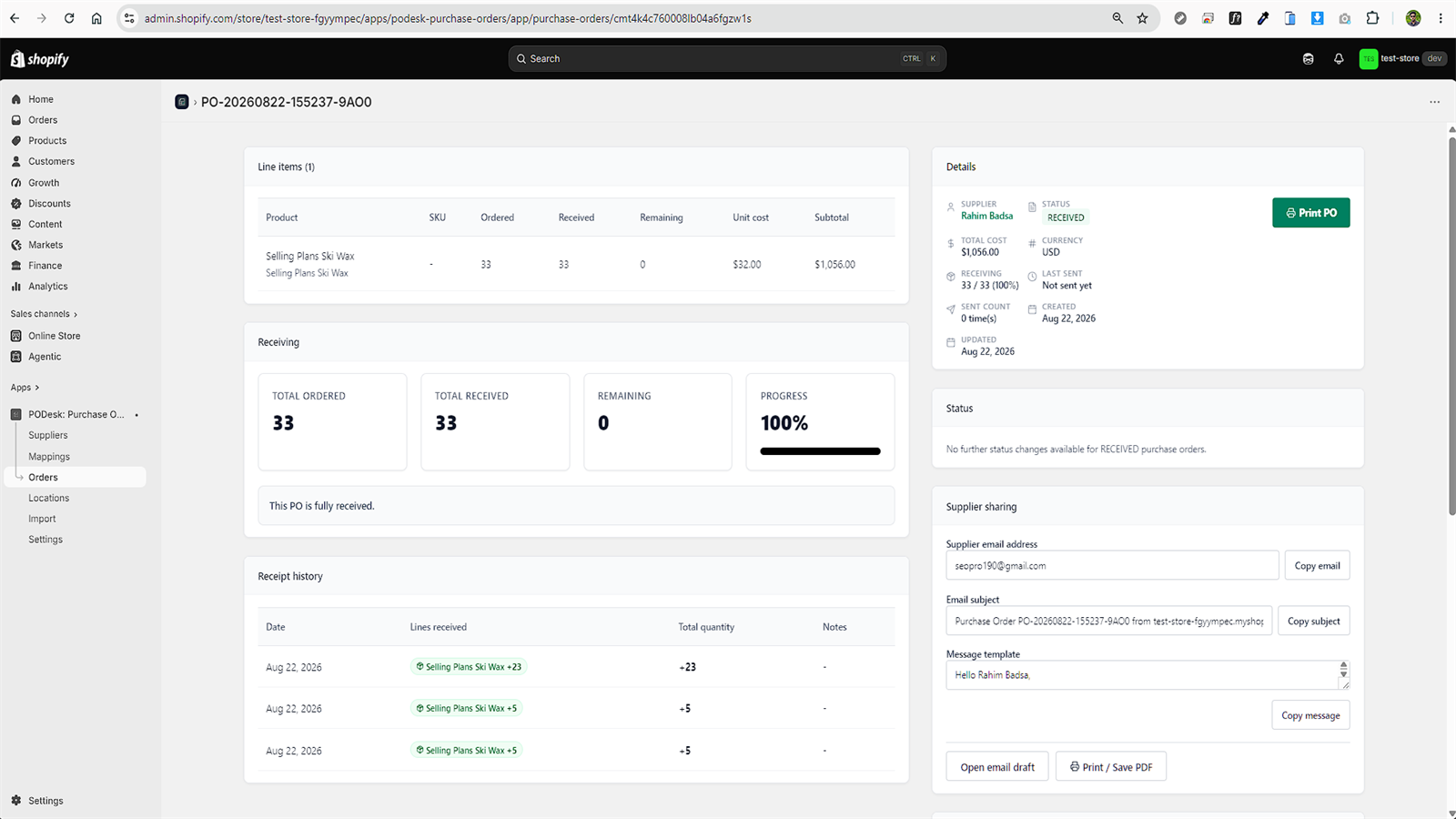
This is where a dedicated purchase order tool like PODesk on the Shopify App Store helps. It connects directly to your Shopify store, syncs product and stock data in read-only mode, maps SKUs to suppliers with wholesale costs, and generates purchase orders with one click. You can also track shipment receiving line-by-line so you always know what has arrived and what is still pending.
Related Resources
Comments
0 replies- No comments yet. Be the first to share your thoughts.